Cloud VMS — video management that lives in the browser
No operator client to install. No VMS server to rack at every site. Live monitoring, playback, floor plans, AI scenarios and the video wall all run in a standard browser.
What is a cloud VMS?
A cloud VMS is a video management system delivered as a hosted web application, so operators reach it through a browser instead of a desktop client installed on each workstation. The console is the product. There is no thick client to package for the IT team, no client version to keep in step with a server version, and no workstation that has to be rebuilt before a new operator can start a shift.
The distinction matters because plenty of legacy systems now offer a “cloud” option that is really a remote-access wrapper around the same desktop architecture — a thinner window onto the same fixed grids and the same separate analytics product. VIZO361 was built browser-first. The layout is an unbounded canvas you can drop tiles onto anywhere. AI scenarios are turned on from inside the same interface. Alerts are drawn onto the recording timeline of the camera that produced them.
What you give up by going cloud is control of the infrastructure. If that is a hard requirement — data residency, an air-gapped network, latency to an external network — the on-premise deployment runs the identical product on hardware you control.
What browser-first actually buys you
Nothing to install
Operators open a URL and sign in. No desktop client to package, no per-workstation licence to track, no version drift between client and server.
WebRTC live streaming
Live video uses a real-time transport rather than a segment-based one. Recorded playback uses HLS, with WebCodecs where the browser supports it.
Views follow the user
Saved monitoring views are server-side objects shared with organisational roles, so a layout built once is available to everyone who should have it.
Zoom without extra load
Digital zoom windows reuse the already-decoded stream, so magnifying a region does not open a second connection to the camera.
Cloud VMS vs on-premise VMS: which should you choose?
Choose cloud unless a specific compliance, network or latency constraint forces on-premise. Both deployments run the same application with the same interface, so this is an infrastructure decision, not a feature decision.
| Consideration | Cloud VMS | On-premise VMS |
|---|---|---|
| Time to a working console | Fastest — nothing to rack or install | Longer — hardware sizing, install, commissioning |
| Operator client | Browser | Browser — the same console |
| Who runs the infrastructure | Hosted for you | Your team, on your hardware |
| Data residency control | Determined by the hosting region | Entirely yours — video never leaves your boundary |
| Air-gapped networks | Not applicable | Supported — the usual reason to choose on-premise |
| Scaling to more sites | Add locations to the hierarchy | Capacity planning per site |
| AI scenarios | Configured inside the VMS | Configured inside the VMS — identical |
| Feature set | Full | Full — same product, same UI |
One console across every site
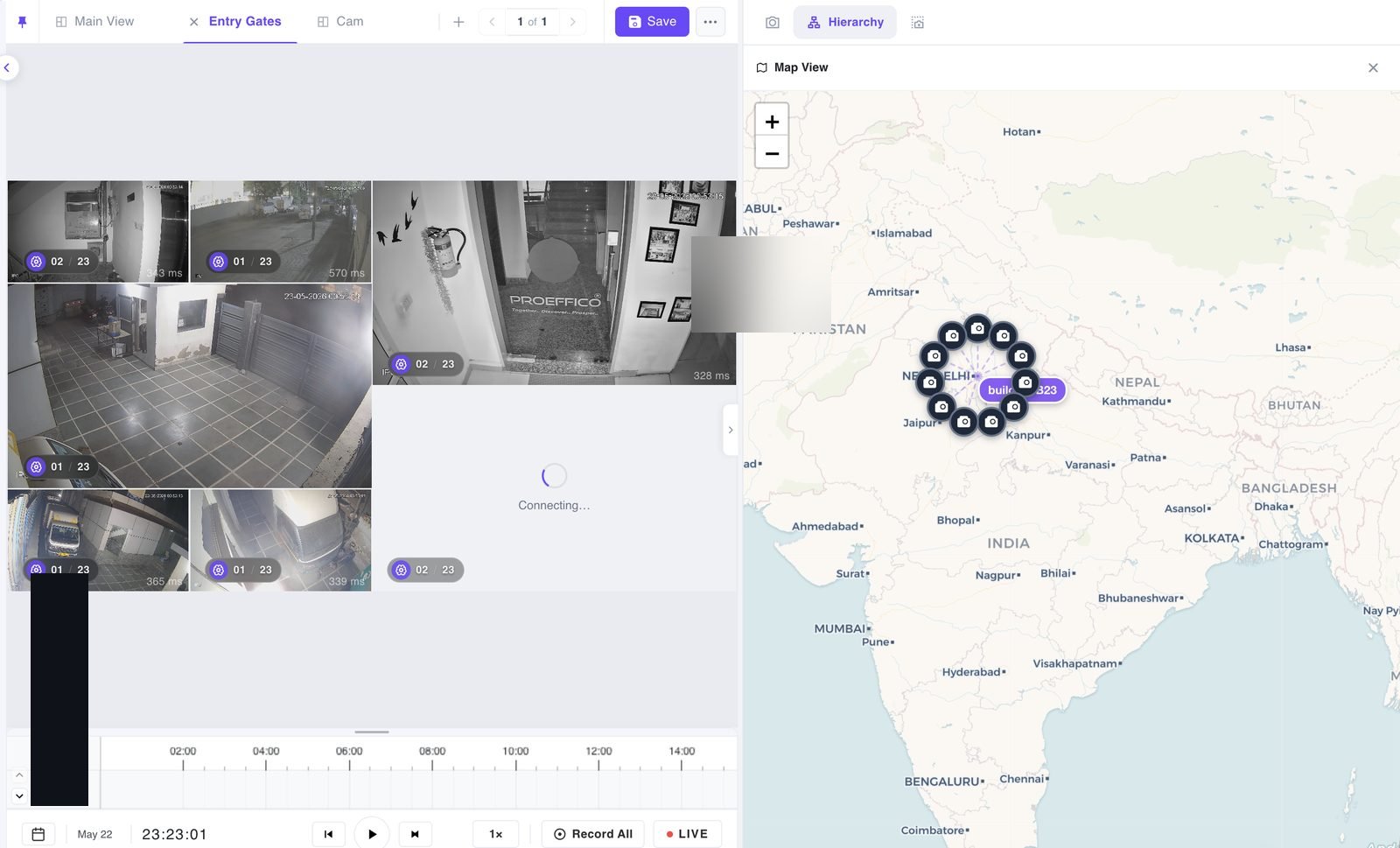
Cameras are organised in a hierarchy that runs from country through state, city and floor, plus any custom levels your estate needs. Search reveals matching branches in place. Drag a whole location group into a monitoring view to load every camera beneath it in one gesture, or open the map-based visualisation to see the same structure geographically.
- Searchable camera catalogue with on-view, not-on-view, online and offline filters
- Multi-select and batch drag-and-drop into a view
- Progressive loading so a large estate does not stall the page
- Drag a camera onto another view tab, or hover a tab to open it mid-drag
- Permission-aware views and floor plans
- Preferences such as panel size and collapsed bars persist per browser
Does a cloud VMS work with the recorders we already own?
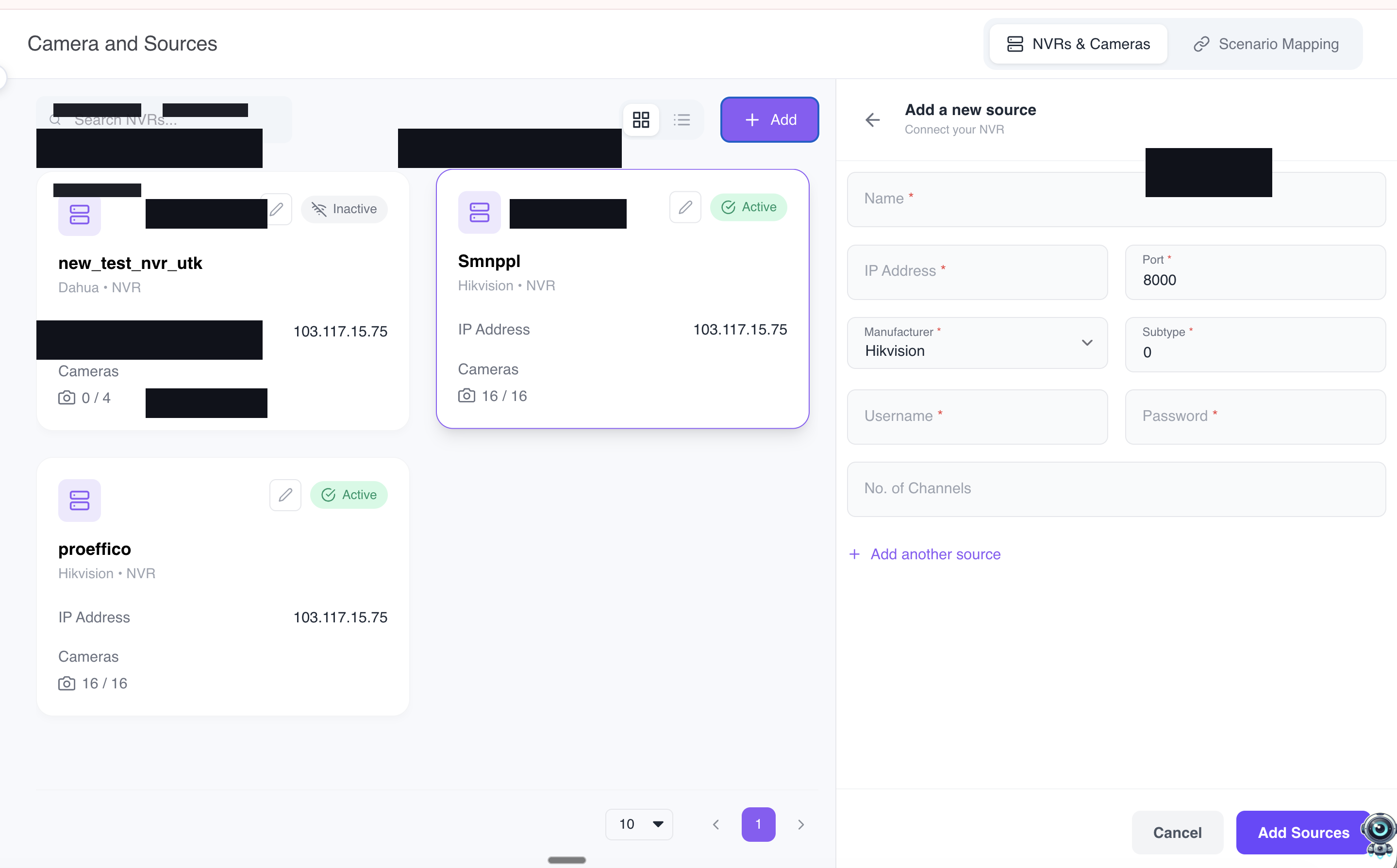
Yes — existing recorders can stay in place as a storage tier. During playback you choose whether footage comes from VMS recording storage or from the connected camera or NVR. A global toggle switches the source for the view, and each tile shows an indicator of which source it is currently playing from, so an investigator is never guessing where the footage came from.
That means the cloud VMS can be the monitoring, AI and investigation layer without forcing a rip-and-replace of recording hardware that is still inside its useful life.
Cloud VMS FAQs
What is a cloud VMS?
A cloud VMS is a video management system delivered as a hosted web application rather than as software you install on a server and a set of operator workstations. Operators reach it through a browser, layouts and preferences follow the user rather than the machine, and updates arrive centrally instead of being packaged for every desktop. VIZO361 is cloud-native: the browser console is the product, not a cut-down remote view of a desktop client.
Do I need to install anything to use a browser-based VMS?
No. There is no operator client to install, license or patch. Everything runs in a standard browser, including live monitoring, synchronised playback, floor plans, AI scenario configuration and the video wall. Preferences such as panel sizes and collapsed bars are stored locally per browser, while saved monitoring views live server-side so they follow the user and can be shared with roles.
Can a VMS run without a server on site?
Yes, that is the point of a cloud VMS. Recording and stream handling are hosted, so there is no VMS server to rack, size or maintain at each location. If you already own NVRs you can keep them: playback can be sourced from VMS storage or from the connected camera or NVR, switched with a global toggle that shows the active source on each tile.
Is browser-based live video fast enough for a control room?
Live streams are delivered over WebRTC, which is the same real-time transport used for video calling, rather than a segment-based protocol. Recorded playback uses HLS, and WebCodecs is used where the browser supports it. Shared stream management means several tiles or zoom windows of the same camera reuse one decoded stream instead of opening duplicate connections.
How does a cloud VMS handle bandwidth with many cameras on screen?
Stream quality is chosen automatically from the size each tile is displayed at, so a dense view of small tiles pulls bandwidth-efficient substreams while a maximised tile pulls the high-quality main stream. Operators can override quality at camera, selection or view level, and cameras that do not publish a substream are handled gracefully rather than failing to load.
Can we move from cloud to on-premise later?
Yes. The on-premise deployment is the same product with the same interface, running on customer-controlled infrastructure. Organisations usually move because of data-residency rules, an air-gapped network, or latency requirements, not because of a feature gap. Operators do not need retraining because the console is identical.
Open a browser. See your own cameras in it.
We will connect a few of your cameras to a live view and let your team drive the console themselves — no install, no workstation build.
Book a cloud VMS demo